SvOlli's EeePC hacks
This webpage is mainly focussed on running the official Asus/Xandros
Linux on the Eee PC. The stuff on this page might also work on other
Distributions, but has never been tested on anything else but Xandros.
Disclaimer:
Any content on this page might wreck to Eee PC to a
state that makes a complete reflash of the solid state disk necessary. I
am NOT resposible for any damage done to anything, if you try anything
that's on this page!
Quicklinks:
Using 2 GB RAM under "Asus Linux" (701 only)
If you replace the 512MB RAM module with a 2GB one, the Linux supplied
by Asus will only use 1GB of it. Here's what I did to overcome this
limitation. Please read this documentation at least once in full, before
starting any actions. It should save you some time.
I will take no responsibility if these will short instructions
will wreck your EeePC. If you don't like this, don't do it.
- First of all I compiled my own kernel from the sourcecode asus supplied.
I used exactly the same configuration that Asus claims to use, except for
the memory option "High Memory Support", where I selected "4GB" instead of
"off". You don't have to do it, you can just download my kernel:
vmlinuz-2.6.21.4-eeepc-2gb.bz2 (Size: 1298400; Date: 2008-02-01, 01:42 CET).
- Once you've got the kernel, copy it into the home directory of
the default user (/home/user) on the EeePC.
- Since you can't copy it to the desired place directly use a Live-CD
/ Live-USB Linux distribution to boot the EeePC and log in as root at
used the following commands to integrate the new kernel.
# mkdir /eeepc/1 /eeepc/2
# mount /dev/sda1 /eeepc/1
# mount /dev/sda2 /eeepc/2
# mv /eeepc/2/home/user/vmlinuz-2.6.21.4-eeepc-2gb.bz2 /eeepc/1/boot
# bzip2 -d /eeepc/1/boot/vmlinuz-2.6.21.4-eeepc-2gb.bz2
# vi /eeepc/1/boot/grub/menu.lst
# umount /eeepc/1
# umount /eeepc/2
# fsck.ext2 -f /dev/sda1
- Two important notes:
- The name of the partitions might differ from /dev/sdaX. Trying
different live distros I've seen /dev/sdbX and /dev/hdcX. You can
find out which one you should use by typing "fdisk -l". The disk
you're looking for has a forth partition "EFI (FAT-12/16/32)"
- "vi /eeepc/1/boot/grub/menu.lst" is the command used to open
up the configuration of the boot loader. Of cause you can use any
editor you like that comes with the distribution you use. nano is
a very popular alternative. Just make sure that it doesn't fold
the text automatically (nano uses the "-w" option).
- Changes to menu.lst:
- Duplicate the four lines starting with "title Normal Boot", the first
one will be our new "2GB" entry and the other one will be the fallback
solution.
-
- So, change the first of our new lined to "title Normal Boot (2GB)"
and in the third one to "kernel /boot/vmlinuz-2.6.21.4-eeepc" to
"/boot/vmlinuz-2.6.21.4-eeepc-2gb" just by adding "-2gb" at the end
of the filename.
- Save it.
- Now it should look like this:
 #
 # Configured by Xandros Configuration system.
 #
 hiddenmenu
 # default boot entry
 default=0

 # Boot automatically after 1 second.
 timeout=1

 # Fallback to Configure.
 fallback=3

 title Normal Boot (2GB)
         root (0x80,0)
         kernel /boot/vmlinuz-2.6.21.4-eeepc-2gb quiet rw vga=785 irqpoll root=/dev/sda1
         initrd /boot/initramfs-eeepc.img

 title Normal Boot
         root (0x80,0)
         kernel /boot/vmlinuz-2.6.21.4-eeepc quiet rw vga=785 irqpoll root=/dev/sda1
 [...the rest is untouched...]
The inserted lines are bold, changes are in red.
- If anything is wrong with the new kernel you can switch back by holding
F9 during startup and selecting "Normal Boot". Also note, that these changes
is now part of the factory settings and will be unaffected by any
restoration.
This should do it. At least that did it for me.
Using aufs instead of unionfs (701 only)
This is another kernel I compiled and a slightly modified initramfs instead
of the unionfs, aufs (another
union fs) is used. It fixed a problem for me that I wasn't able to mount
filesystem-images via loopback. Integration is similar as described above.
F9 and a reset to factory settings is strongly recommended for using this
kernel and initramfs. (This kernel also supports 2GB of RAM.) They have
served me well for several months until I sold my 701.
eeepc-kernel-initramfs-aufs.tar.bz2 (Size: 1607016; Date: 2008-11-26, 22:35 CET)
Write-To-RAM initramfs
(for Version 1.6 Asus/Xandros only, NOT original 701)
Intended as a testcase to show the speedup of the Eee PC 900A when
freed of its slow SSD, it also suits the purpose of running a test
installation, etc. without being forced to the F9-Boot-Restore routine if
something goes wrong. Every change done will be lost on reset or
shutdown. It was also tested on a 901 and worked there as expected.
Installation is easy:
wget http://svolli.org/download.php/software/eeepc/initramfs-900a-ram.img
sudo mount -o remount,rw /ro
sudo cp initramfs-900a-ram.img /ro/boot/initramfs-eeepc.img2
sudo mount -o remount,ro /ro
Usage is also rather easy:
- use F9-Boot to get the menu
- press "e" to edit the "Normal Boot" entry
- select the last entry (the one starting with "initrd ...")
- press "e" again to edit this line
- append "2" to the line and press enter
- press "b" to boot
That's it. Reads a bit complicated, but that's just because every single
step has been described.
initramfs-900a-ram.img (Size: 426805; Date: 2009-01-03, 21:55 CET)
The Samba Security Leak (701 only)
This workaround is now obsolete, since fixed packages are available now.
(If you really want to know look into the HTML source code.)
D1X-Rebirth
I compiled the source for d1x-rebirth
for the Linux Asus supplies with the Eee PC. It works fine on my system.
For installation download the supplied executable, unpack it with "bzip2 -d"
copy it to /usr/local/bin and set the executable flags. Finally create the
directory /usr/local/share/games/d1x-rebirth and put descent.hog and
descent.pig in there. Run d1x-rebirth and everything should be fine.
Happy hunting!
d1x-rebirth-gl.bz2 (Size: 323879; Date: 2008-02-11, 22:37 CET)
Firefox 3
Asus has released an update containing Firefox 3.0.4 and
Flashplayer 10, making this package rather obsolete, at least for my
Eee PC 901 (US Version) and 900A (German Version).
When you want to install Firefox 3 on the EeePC you'll it won't let you
start, because the gtk+ 2.8 libraries are too old. To fix this problem
download this archive containing gtk+ 2.10 libraries, und untar it
inside the directory containing Firefox 3. Then you'll get sufficient
libraries that are only used by Firefox.
gtk-2.10-so_for_firefox3.tar.bz2 (Size: 1707744; Date: 2008-10-24, 21:07 CEST)
flash10patcher
Asus has released an update containing Firefox 3.0.4 and
Flashplayer 10, making this package rather obsolete, at least for my
Eee PC 901 (US Version) and 900A (German Version).
Another tool of pure evil hacked together to get the Adobe Flashplayer 10
plugin working on Asus/Xandros Linux. The Flashplayer is compiled in a way
that it needs at least a glibc-2.4. Debian 4.0 and Xandros only provide
glibc-2.3.6. This tool patches the binary to request only a 2.3 compatible
glibc instead of a 2.4 one. It is done without any elf tools, just by a
simple binary search and replace. Feel free to take a look at the sourcecode.
It works for me, as I just watched a YouTube Clip with a patched plugin on
my Eee PC 901 running Asus/Xandros Linux.
flash10patcher-0.2.tar.bz2 (Size: 4954; Date: 2008-11-29, 19:42 CET)
Dropouts with LinDVD
The LinDVD software included with my Eee PCs had dropouts when playing a
DVD. These were caused by other software that ran in the background.
Renicing the main playing process solved this problem. Change the LinDVD
startup-script /opt/lindvd/lindvd to: (added parts are in red)
#!/bin/sh
/opt/lindvd/lindvd-bin --asus-eeepc --autoplay &
sudo renice -20 -p $!
SLART installation on Eee PC
SLART is a little tool collecion for audio files.
It's core component is Partyman, a double-deck-like audio player. Here
you'll get everything you need, to install it on your Eee PC.
"slart-prepare.sh" is a small script that downloads and installs the packages
that slart depends on and that are not installed on the Eee PC. "slart"
are the main programs and also contains the needed soundmix-daemon
DerMixD, and "slart-helper" is an Easymode
icon for Partyman.
slart-prepare.sh.bz2 (Size: 486; Date: 2009-01-08, 12:22 CET)
slart_0.7.5-591_i386.deb (Size: 883074; Date: 2009-12-20, 21:57 CET)
slart-helper_0.2-2_all.deb (Size: 172438; Date: 2009-07-23, 22:20 CEST)
eeetray
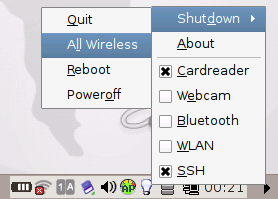 I hacked a small tool for the Xandros Linux distribution that sits in the
system tray with the image of a light blub and allows to start/stop wireless
lan, bluetooth, webcam, internal cardreader, 3G modem and ssh (if
installed) individually. There are also options to shutdown or reboot the
system without any further confirmation. When running on battery it also
displays the time left as a tooltip.
No big deal, but quite handy for me. To get it run on system start, put
it in /usr/lib/fastlaunch or create a symlink there.
I hacked a small tool for the Xandros Linux distribution that sits in the
system tray with the image of a light blub and allows to start/stop wireless
lan, bluetooth, webcam, internal cardreader, 3G modem and ssh (if
installed) individually. There are also options to shutdown or reboot the
system without any further confirmation. When running on battery it also
displays the time left as a tooltip.
No big deal, but quite handy for me. To get it run on system start, put
it in /usr/lib/fastlaunch or create a symlink there.
eeetray-0.8.tar.bz2 (Size: 17277; Date: 2008-12-22, 08:39 CET)
History:
- 2009-12-20:
- Updated SLART package to release version 0.7.5-591.
- 2009-07-23:
- Updated slart-helper package to 0.2-2.
- 2009-07-12:
- Updated SLART package to release version 0.7.4-546.
- 2009-04-20:
- Updated SLART package to release version 0.7.3-457.
- 2009-03-28:
- Updated SLART package to release version 0.7.2-436.
- 2009-01-24:
- Updated SLART package to release version 0.7.1-415.
- 2009-01-09:
- Updated SLART package to release version 0.7-402.
- 2009-01-08:
- Added SLART package 0.7-389.
- 2009-01-07:
- Reordered page.
- 2009-01-04:
- Added the LinDVD hint.
- Added the Write-To-RAM initramfs.
- 2008-12-21:
- Updated eeetray to 0.8: added tooltip of time left when running on
battery.
- 2008-12-20:
- Added note about flash10patcher and gtk+ libraries for Firefox being
obsolete.
- 2008-12-03:
- Updated eeetray to 0.7: output of commands will be suppressed and
fixed another bug on turning 3G modem on/off.
- 2008-12-01:
- Updated eeetray to 0.6: added shutdown all wireless option and
fixed bug on turning 3G modem on/off.
- 2008-11-29:
- Updated eeetray to 0.5: added 3G modem of 901 GO.
- Updated flash10patcher to 0.2: added script for generating .deb-package.
- 2008-11-28:
- Added flash10patcher.
- 2008-11-26:
- Added aufs kernel and initramfs.
- Updated eeetray to 0.4: menu entries are only displayed when hardware /
service exists.
- 2008-11-23:
- Updated eeetray to 0.3: icon changes during execution.
- 2008-11-22:
- Updated eeetray to 0.2: added camera & cardreader.
- 2008-11-17:
- Added eeetray.
- 2008-10-24:
- Added gtk+ libraries for Firefox 3.
- 2008-02-12:
- Added recommendation about samba security leak.
- 2008-02-11:
- Added D1X-Rebirth Download
- 2008-02-03:
- Added note about "F9 during startup"-feature.
- 2008-02-02:
- Initial release of this page and everything on it.
